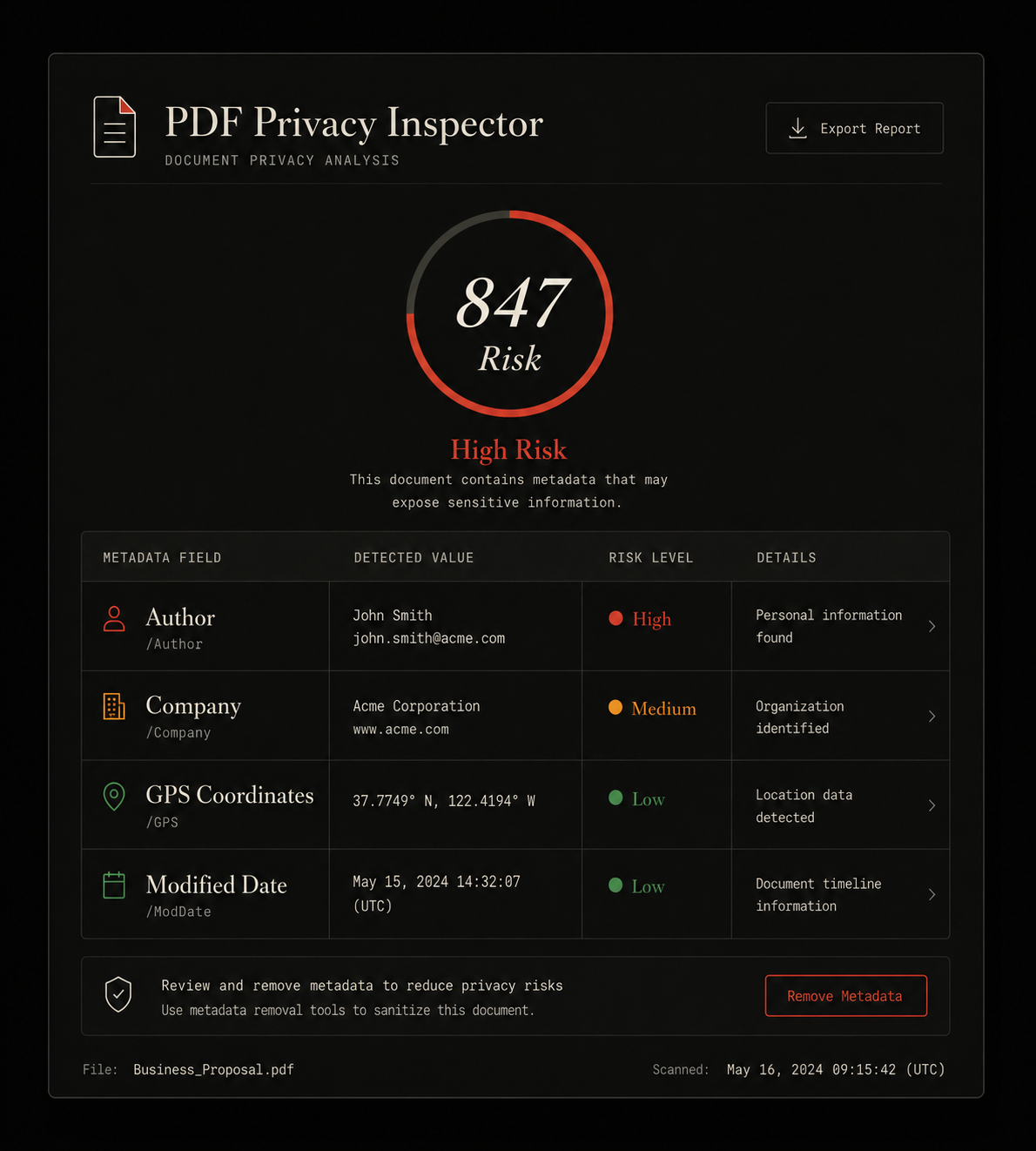
In 2019, a UK public sector body published a redacted report online. The redaction was done properly — black boxes over the sensitive text. But nobody had touched the metadata. The PDF's Author field contained the name of the civil servant who drafted it. The modification timestamp revealed exactly when the redactions were applied. Within twenty-four hours, journalists had used that information to identify the author and establish a timeline that contradicted the official account of when the report was prepared.
This is not an edge case. It happens repeatedly, across sectors, because PDF metadata is invisible to the people creating and sharing documents — but completely readable by anyone who receives them. Under GDPR, that invisibility does not provide legal cover. Personal data embedded in a document's metadata is still personal data.
What GDPR actually says about metadata
The GDPR does not mention PDF metadata specifically. It does not need to. The regulation's definition of personal data is intentionally broad — and PDF metadata falls squarely within it.
Walk through that definition against what a standard PDF metadata field contains:
- Author field — contains the natural person's name. That is personal data by the first clause.
- GPS coordinates — explicitly called out in Article 4(1) as "location data." Personal data.
- Manager field — the name of the document creator's manager, sourced from corporate Active Directory. Personal data for two people simultaneously.
- Company field — not personal data on its own, but in combination with the Author field it can identify a specific individual within a specific organization.
- Modification timestamp — not personal data in isolation, but in combination with other fields it can reveal information about a specific person's working patterns.
The combination principle matters. Recital 26 of the GDPR clarifies that anonymisation must ensure individuals cannot be identified by any reasonable means, taking into account all available information. A PDF where the Author field is stripped but the Manager, Company, and GPS fields remain is not anonymised — the individual may still be identifiable.
Which GDPR principles PDF metadata triggers
Three principles from Article 5 are directly implicated every time a PDF containing personal metadata is shared externally.
When you send a PDF contract to a client, the purpose of that processing is to communicate the contract terms. The author's name, GPS coordinates of your office, and the modification history of the document are not necessary to fulfil that purpose. Under data minimisation, they should not be included.
Employee data collected for HR purposes — including the name stored in a corporate Active Directory account that populates PDF Author fields — was collected for internal employment purposes. Sharing that data with a third party embedded in a document is a secondary use that the employee was almost certainly not informed about and did not consent to.
The person whose data appears in the metadata is the data subject — the employee whose name is in the Author field. They have rights under GDPR: the right to be informed, the right to erasure, the right to restrict processing. When their name is embedded in a PDF sent to a third party, those rights become very difficult to honour in practice.
The data breach risk most organizations overlook
Under GDPR Article 33, organizations must notify their supervisory authority within 72 hours of becoming aware of a personal data breach that is likely to result in a risk to the rights and freedoms of individuals.
A PDF published on a public website — a government report, a press release, an annual review — that contains an employee's name or location in its metadata is a personal data breach. The data was not intended to be published. The subject was not informed. The GDPR definition of a breach is met.
Whether it rises to the level requiring supervisory authority notification depends on the risk assessment, which is the DPO's call. But the starting point — a breach occurred — is clear.
While no major GDPR fine has been issued solely for PDF metadata exposure, the ICO in the UK has explicitly addressed metadata in its published guidance on "Information Security — Practical Guide," noting that metadata in shared documents constitutes a common and avoidable data leak. Several subject access requests (SARs) in EU member states have successfully compelled organizations to disclose what personal data appears in document metadata.
How metadata actually flows through your organization
The problem is systematic, not occasional. Understanding how metadata gets into documents helps compliance teams address it at the right point in the workflow.
Employee joins organization
Name, job title, manager stored in Active Directory / HR system
Employee creates document in Word / Google Docs
Software reads OS account → auto-populates Author, Manager, Company
Document exported as PDF
Metadata transferred intact. XMP stream and DocInfo both populated.
PDF shared externally
Emailed to client, uploaded to website, submitted to regulator.
The critical intervention point is between step 3 and step 4. Before any PDF leaves your organization's control, metadata should be inspected and stripped. This is where a tool like PDF Metadata Remover fits into a GDPR-compliant document workflow — processing entirely in the browser, never uploading the file to a third party server, and producing a clean PDF that can be verified before sending.
Inspect your PDF for GDPR risks
See every personal data field. Privacy Risk Score included. Browser-only — your file never leaves your device.
What a GDPR-compliant PDF workflow looks like
The goal is not to strip metadata from every internal document — that would be operationally impractical and unnecessary. The requirement is proportionate: personal data in metadata should be removed when documents are shared externally, published publicly, or submitted to third parties.
Here is a practical checklist for Data Protection Officers building this into their organization's document handling procedures:
Audit your current document workflow
Identify all document types shared externally — contracts, reports, proposals, invoices, press releases. Test a sample of each type for metadata content using FileIntel or ExifTool.
Map the personal data in your metadata
Document which fields contain personal data for each document type. Author and Manager fields are almost always personal data. GPS coordinates are high-risk. Company and software version may be organization data rather than personal data depending on context.
Update your ROPA (Record of Processing Activities)
Under GDPR Article 30, your ROPA should document processing activities including the sharing of personal data embedded in documents. If metadata stripping becomes standard practice, document that as a technical measure in your ROPA.
Implement a pre-send metadata strip as standard procedure
Add a metadata inspection and stripping step to your document-sharing workflow. This can be a team policy ("strip before sending") or a technical control at the email gateway level for organizations with the infrastructure to implement it.
Verify the strip worked before sending
A stripped PDF should be re-inspected to confirm high-risk fields are empty. FileIntel's Privacy Risk Score makes this a 30-second verification step. A score near zero after stripping confirms the clean was complete.
Train document creators on metadata risk
Most people who create PDFs have no idea metadata exists. A short internal briefing — explaining what metadata is, what it can reveal, and how to strip it — is part of your Article 32 obligation to implement appropriate technical and organisational measures.
Include metadata in your breach response procedures
Update your data breach response procedure to include a metadata check when investigating potential breaches involving shared documents. If a document was published publicly with personal data in its metadata, the breach response timeline under Article 33 applies.
The UK GDPR position post-Brexit
For organizations operating under UK GDPR (as retained and amended by the Data Protection Act 2018), the position is substantively identical. The ICO applies the same personal data definition and the same data minimisation principles. The ICO's published guidance specifically identifies metadata in shared documents as a common source of unnecessary personal data disclosure.
Organizations operating across both EU GDPR and UK GDPR jurisdictions — which includes most UK businesses with EU customers or EU operations — can apply a single metadata management policy that satisfies both frameworks, since the substantive requirements are the same.
A note on legal advice
This article explains the technical and regulatory context around PDF metadata and GDPR based on the published text of the regulation and publicly available regulatory guidance. It is not legal advice. Organizations with specific compliance obligations should consult a qualified data protection practitioner or legal advisor for guidance tailored to their circumstances.
What is clear without legal advice: PDF metadata can contain personal data, personal data shared without necessity violates GDPR's minimisation principles, and stripping that metadata before external sharing is a proportionate, low-cost technical measure that addresses the risk.
Start your GDPR PDF audit now
Free. Browser-only. Your file never reaches our servers — or anyone else's.